To improve the efficiency of the team.
Peek Definition(select the key you want to peek, and click Alt+F12 )
Peek help in MSDN (select the key you want to peek, and click Alt +F1)
Navigate To(Ctrl +,)
CodeLens (Tool->Option->Text Editor->All Languages->CodeLens)
Quick Launch (Ctrl+Q)
Debug->Performance and Diagnostics
Edit and Continue supported for 64bit
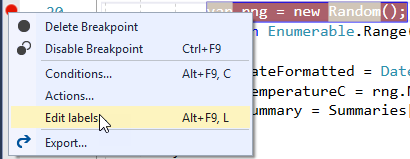
Within Visual Studio, once you’ve created a breakpoint, you can add one or more labels to it by simply right-clicking and choosing Edit Labels:
edit-breakpoint-label
After adding labels to breakpoints, you can view them in the Breakpoints window:
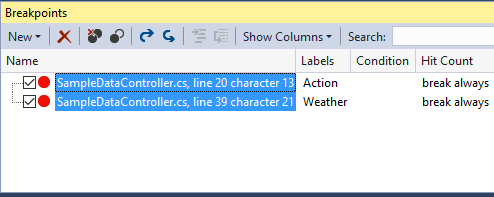
breakpoint window
If you present code at conferences, user groups, etc., you may find labeled breakpoints useful during demos. You can add a label like “Demo 1” to some breakpoints, and “Demo 2” to others. Toggle which breakpoints are enabled when you run your application in order to demonstrate different topics.
https://www.codeproject.com/tips/1042975/tips-to-improve-visual-studio-build-performance
Incremental Search Ctrl + I
Find All Reference Shift + F12
Full Screen Shift+Alt+Enter
Go To Implementation Ctrl + F12
Terminal emulator for Visual Studio. Allows you to run command prompt, powershell, WSL bash. All including interactive mode.